T
TechpressoGist · Reading time: 4 min

 the gist
Private beta · 10 places maximum
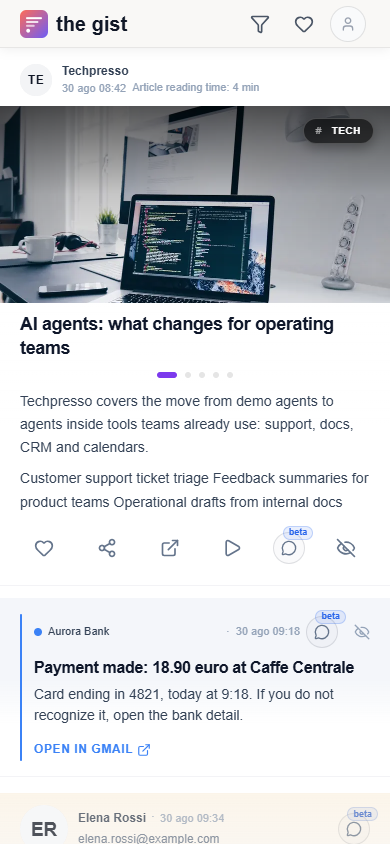
Your emails become cards with images, summaries and key points. Scroll your feed, explore what interests you and open the original when you need it.
Just leave your email. You connect Gmail only after getting beta access.
The feed in the app · demo content
See how it works
Try the slides and compare the two formats. A simplified app preview with demo content, not user emails.
Before
This week we look beyond AI agent demos. Across vendor announcements and team stories, the useful signal is their arrival in everyday support, product and operations work.
Support teams are testing small workflows that classify tickets, summarize customer history and draft a reply for human approval. Product teams gather feedback from sales conversations, reviews and support requests to identify recurring themes and questions for the next release.
Support teams are testing small workflows that classify tickets, summarize customer history and draft a reply for human approval. Product teams gather feedback from sales conversations, reviews and support requests to identify recurring themes and questions for the next release.
The value is not another chatbot. It is finding context and preparing the next step without copying information between documents, CRM records, calendars and internal chat. Fewer manual handoffs can mean fewer alignment meetings and more context when a request arrives.
Tools to watch include Intercom Fin and Zendesk AI for support, Zapier Agents and Relay.app for operations, and Notion AI and Glean for internal knowledge. This does not mean adopting them all: look for a small, useful experiment.
Before choosing a tool, pick a repetitive process and measure the time lost in its first manual step. Try automating that step and check whether it really reduces friction. Keep people in control of judgment calls, negotiation and sensitive decisions.
A long email → key points to explore.
In the app, you can open the original in Gmail. Here you can read the demo email.
After
The Gist
Each email becomes a gist: enough context to decide, with the original always one tap away.
Stories and images in scrollable cards.
Thread context and the next action.
The useful information, without the noise.
FAQ
The beta is free. I cover AI costs for the first 10 participants.
Every gist keeps a link to the original email.
The Gist is in private beta and Google verification is not yet complete. Access is read-only and you can revoke it anytime.
Just leave your email. You connect Gmail only after getting beta access.
I cover the AI costs for this first beta. That is why access is limited to 10 people.