Private beta · Gmail read-only

Turn Gmail into a feed you actually want to read.

The Gist pulls newsletters, promos and updates from your inbox and turns them into the useful part: short cards, easy to scan, with the original always one tap away.

See how it works

Official Google access, read-only

The Gist cannot send, delete or edit your emails.

Logothe gist
K
Knowledge Brief
Today 8:42 · Carousel reading time: 4 min
Real photo of a work setup
# IDEAS

How to build a second digital memory

We read more than we can use. The value is not saving everything: it is finding the right idea when a decision needs it.

A useful second memory does not archive the past. It turns notes, newsletters and links into clear next actions.

Promotion
D
Design Weekly·36 min ago

Creative bundle for better presentations

Templates, icons and mockups to polish decks and landing pages without starting over.

-35%49 euro75 euroEnds Friday
Aurora Bank·1 hour ago

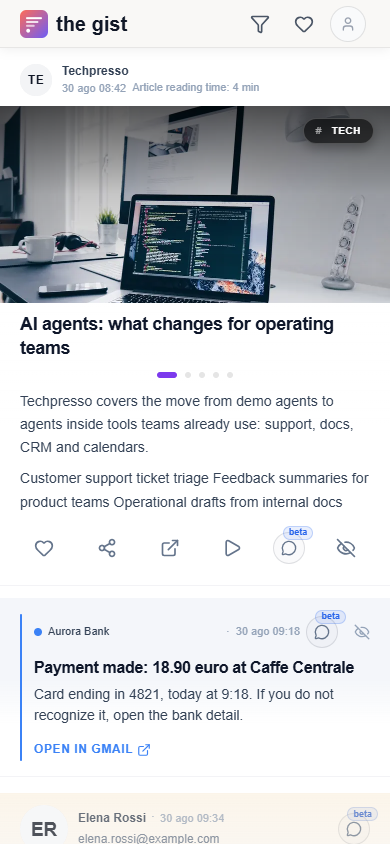
Payment made: 18.90 euro at Caffe Centrale

Card ending in 4821, today at 9:18. If you do not recognize it, open the bank detail.

ER
Elena Rossi·22 min ago
elena.rossi@example.com

Re: Q3 newsletter proposal

  • Confirms interest in the draft.
  • Asks for a version by Friday.

Product demo

Watch an email
become a card.

Logothe gist
K
Knowledge Brief
Today 8:42 · Carousel reading time: 4 min
Real photo of a work setup
# IDEAS

How to build a second digital memory

We read more than we can use. The value is not saving everything: it is finding the right idea when a decision needs it.

A useful second memory does not archive the past. It turns notes, newsletters and links into clear next actions.

Promotion
D
Design Weekly·36 min ago

Creative bundle for better presentations

Templates, icons and mockups to polish decks and landing pages without starting over.

-35%49 euro75 euroEnds Friday
Aurora Bank·1 hour ago

Payment made: 18.90 euro at Caffe Centrale

Card ending in 4821, today at 9:18. If you do not recognize it, open the bank detail.

ER
Elena Rossi·22 min ago
elena.rossi@example.com

Re: Q3 newsletter proposal

  • Confirms interest in the draft.
  • Asks for a version by Friday.

Your inbox should not decide what you read.

Before / After

Understand first. Then decide what to read.

Your emails stay in your inbox. The Gist quickly shows the topic, the key points and why an email may deserve your attention.

See what emails are about without opening them one by one.

Know what deserves time and what you can skip.

Go deeper in the app only when the content is worth it.

Main idea

Understand the topic in seconds

The card tells you what the email is about and why it might matter.

Read in 45s

Key points

Find the essentials immediately

Title, summary and key points pull out the signal without making you read everything.

Read in 45s

Original

Choose what to explore

If the topic matters, open the original. If it does not, you already know enough to move on.

Read in 45s

Before

Original email

From: Techpresso <brief@techpresso.example>
To: Francesco · today 8:42
Newsletter

AI agents are moving from demos to daily operations

Techpresso Daily #184

The practical AI shift teams should watch this week

A practical briefing on how agent workflows are entering support, product and operations work.

Long introSponsor7 linksFooter

Quick note before the links: the AI agent conversation is shifting from demos to operational routines, but the useful signal is buried across vendor updates, team anecdotes and half-promotional examples.

Over the last week we tracked a familiar pattern: support teams are not asking for a magic assistant, they are testing small triage flows that classify tickets, summarize the customer history and draft the first reply before a human reviews it. Product teams are doing something similar with feedback: long threads from sales calls, review sites and support queues are being compressed into themes, objections and next release questions.

The confusing part is that every vendor describes this as a different category. Some call it an agent, others call it an automation layer, others call it a copilot that can take action. The practical difference is less glamorous: the workflow reads from a source, applies context, proposes a next step and waits for approval. That is where the actual productivity gain begins, especially when the work used to require copying snippets between docs, CRM records, calendars and internal chat.

Tool watchlist for this week: Intercom Fin is leaning deeper into support resolution, Zendesk AI is expanding ticket intelligence, Zapier Agents is trying to connect everyday tools, Relay.app is packaging repeatable operations, Notion AI is becoming more useful around internal knowledge and Glean keeps showing up when teams need search across scattered company context. None of this means you should adopt everything; it means the category is moving from impressive demo to boring daily use.

Useful action: before you evaluate another agent product, pick one repetitive flow and write down the first manual step that wastes time. If the step is finding context, summarizing a thread or moving information into another tool, it is a good candidate for a small experiment. If the step requires judgment, negotiation or sensitive decisions, keep the human in front and use AI only to prepare the context.

You are receiving this because you subscribed to Techpresso Daily. Share, sponsor, manage preferences, unsubscribe, view in browser, privacy policy.

After

T
Techpresso
Gist · Carousel reading time: 4 min
# AI

AI agents: what changes for operating teams

What happened

Techpresso covers the move from demo agents to agents inside tools teams already use: support, docs, CRM and calendars.

  • Customer support ticket triage
  • Feedback summaries for product teams
  • Operational drafts from internal docs

Removes noise

Footers, preheaders and artificial urgency stop competing with the content that matters.

Rewrites into feed format

Title, reading time, source, summary and action. Every email becomes ready to scroll.

Unifies languages and formats

English newsletters, technical updates and promos end up in one coherent format.

You saw the before / after

Try it with your inbox, not a demo.

The point is not making a fake email easier to read. It is seeing how much noise disappears from the newsletters you actually receive.

Gmail read-only access. No card.

Full beta for free

Understand the value before deciding whether to use it. No credit card.

Read-only Google OAuth

The permission stays in your account: The Gist cannot send, delete or edit emails.

Limited private beta

We are letting people in gradually so the first feed works well.

Examples

Four emails.
Four formats.

A demo with fake but realistic senders: newsletters, promos, bank notifications and personal messages do not all become the same template.

K
Knowledge Brief
Today 8:42 · 4 min
# IDEAS

Second digital memory

Find the right idea when you need to decide.

Promotion
D
Design Weekly·36m

Creative bundle for presentations

Templates and mockups to polish decks and landing pages.

-35%49 euro
Aurora Bank·1h

Payment: 18.90 euro at Caffe Centrale

Approved payment with card ending in 4821, today at 9:18.

CategoryCafes and restaurants
MethodPhysical card
StatusConfirmed

Amount, merchant and useful action. Everything else disappears.

ER
Elena Rossi · 22 min ago
elena.rossi@example.com

Re: Q3 newsletter proposal

  • Confirms interest in the draft.
  • Asks for a version by Friday.
  • Wants to keep the tone editorial, not commercial.
Thread context

3 messages: brief, draft, final request.

Next action

Send a short version by Friday morning.

If you receive a lot of newsletters

The next step is generating your first feed.

Connect Gmail, wait for the first triage and decide whether The Gist deserves a place in your routine.

Free during the private beta.

How it works

Three steps. Then scroll.

01

Connect Gmail read-only

Official Google OAuth, read-only access. No password, and you can revoke it anytime.

02

The Gist finds what is worth reading

It separates newsletters, promos and updates, then extracts title, summary, key points and next action.

03

Open a feed ready to scroll

Read cards, save what matters and open Gmail only when you want the original email.

Privacy

It reads to summarize. It does not touch your mail.

Gmail stays yours

The Gist uses read-only access: it cannot send, delete or edit emails.

Revoke anytime

The permission stays in your Google account and you can remove it whenever you want.

Delete your data

You can delete account and preferences without manual steps.

Founder note

F

Francesco

Founder of The Gist

"I am building The Gist for people who love reading, but do not want to live inside Gmail."

Free private beta

Create your Gmail feed in 30 seconds.

Full access during beta. No credit card. Gmail stays read-only and you can revoke everything anytime.

Free beta with limited initial seats.

FAQ

Normal questions.

Only read the emails needed to create the feed. It cannot send, delete or edit messages.